

设计思路:
- 统计job 基础信息,记录为max_mem.log
- 统计job reserved信息,记录为reserved.log
- 合并上面两个信息,记录为merge.log
- 计算筛选出差值的2倍job
- 对结果进行排序方便查看
输出结果展示:
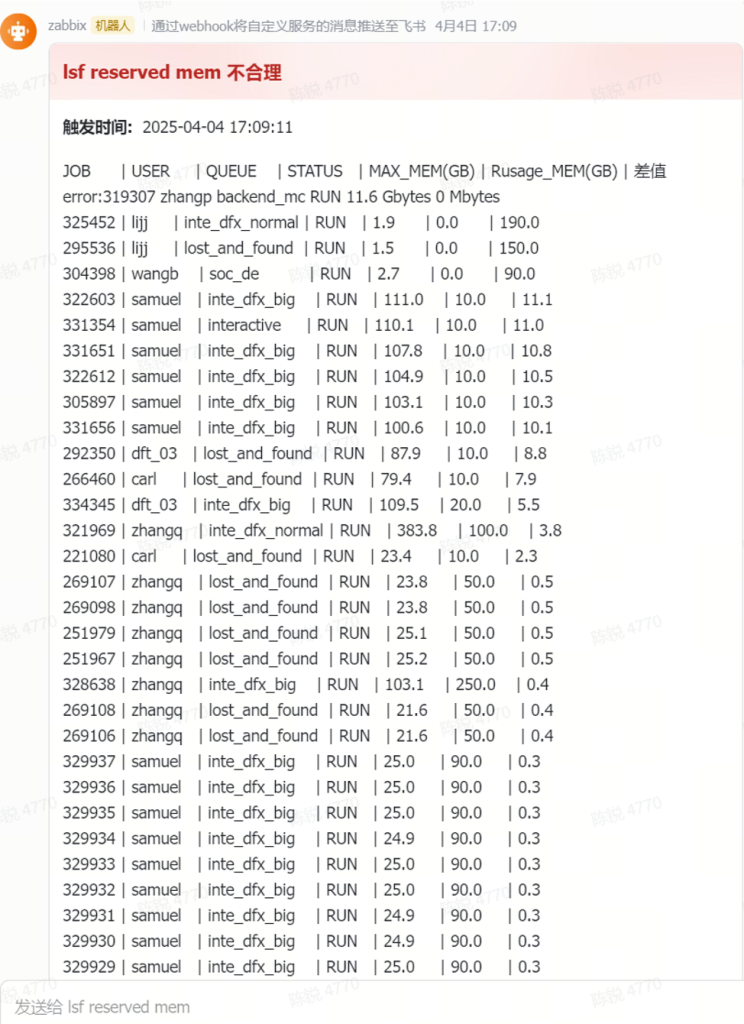
步骤一,设计运行脚本:
more start.sh result.sh reserved.sh merge.sh max_mem.sh account.sh
::::::::::::::
start.sh
::::::::::::::
#!/bin/csh
#统计job 基础信息,记录为max_mem.log
/home/chenrui/reserved_zabbix/max_mem.sh >/home/chenrui/reserved_zabbix/max_mem.log
#统计job reserved信息,记录为reserved.log
/home/chenrui/reserved_zabbix/reserved.sh > /home/chenrui/reserved_zabbix/reserved.log
#合并信息,记录为merge.log
/home/chenrui/reserved_zabbix/merge.sh > /home/chenrui/reserved_zabbix/merge.log
#计算筛选出差值2倍的job
/home/chenrui/reserved_zabbix/account.sh > /home/chenrui/reserved_zabbix/account.log
sleep 5
#对结果进行排序方便查看
/home/chenrui/reserved_zabbix/result.sh > /home/chenrui/lsf.reserved.stat
::::::::::::::
result.sh
::::::::::::::
#!/bin/csh
awk ‘NR==1; NR>1{print | “sort -k”NF”,”NF” -nr”}’ /home/chenrui/reserved_zabbix/account.log
::::::::::::::
reserved.sh
::::::::::::::
#!/bin/csh
# 脚本功能:精确提取 bjobs 输出中的 jobid 和有效 rusage[mem=] 值,严格去重
# 设置临时文件
set tempfile = “/tmp/bjobs_rusage_$$.tmp”
# 处理 bjobs 输出(严格模式)
bjobs -u all -l | \
awk ‘\
BEGIN { printed_jobs = “” } \
/^Job </ { \
jobid = $2; \
gsub(/[<>,]/, “”, jobid); \
current_job = jobid; \
valid_entry = 0 \
} \
/rusage\[mem=[0-9]/ { \
if ($0 ~ /rusage\[mem=[0-9]+(\.[0-9]+)?\]/) { \
match($0, /rusage\[mem=([0-9.]+)\]/, arr); \
if (arr[1] != “” && printed_jobs !~ ” “current_job” “) { \
print current_job, arr[1]; \
printed_jobs = printed_jobs ” ” current_job ” “; \
valid_entry = 1 \
} \
} \
} \
END { if (valid_entry == 0 && current_job != “”) print “DEBUG: No valid rusage for”, current_job > “/dev/stderr” } \
‘ > $tempfile
# 显示有效结果
if (-e $tempfile) then
# 二次过滤确保只有数字型内存值
awk ‘$2 ~ /^[0-9]+(\.[0-9]+)?$/ {print $1, $2}’ $tempfile
rm -f $tempfile
else
echo “错误:未能提取有效数据” >&2
exit 1
endif
exit 0
::::::::::::::
merge.sh
::::::::::::::
#!/bin/csh
awk ‘NR==FNR {dict[$1]=$2; next} $1 in dict {print $0, dict[$1] ” Mbytes”}’ /home/chenrui/reserved_zabbix/reserved.log /home/chenrui/reserved_zabbix/max_mem.log
::::::::::::::
max_mem.sh
::::::::::::::
#!/bin/csh
bjobs -u all -o “jobid user queue stat max_mem” | grep RUN
::::::::::::::
account.sh
::::::::::::::
#!/bin/csh
set KB_to_GB = 0.000001
set MB_to_GB = 0.001
set TB_to_GB = 1000
# 打印表头
printf “%-8s | %-8s | %-8s | %-8s | %-8s | %-8s | %-8s\n” \
“JOB” “USER” “QUEUE” “STATUS” “MAX_MEM(GB)” “Rusage_MEM(GB)” “差值”
foreach line (“`cat /home/chenrui/reserved_zabbix/merge.log`”)
set fields = ($line)
set dataA = $fields[5]
set unitA = $fields[6]
set dataB = $fields[7]
set unitB = $fields[8]
# 转换A数据到GB
if ($dataA == 0) then
set gbA = 0
else if ($unitA == “Tbytes”) then
set gbA = `echo “$dataA * $TB_to_GB” | bc`
else if ($unitA == “Gbytes”) then
set gbA = $dataA
else if ($unitA == “Mbytes”) then
set gbA = `echo “$dataA * $MB_to_GB” | bc`
else if ($unitA == “Kbytes”) then
set gbA = `echo “$dataA * $KB_to_GB” | bc`
endif
# 转换B数据到GB
if ($dataB == 0) then
set gbB = 0
else if ($unitB == “Tbytes”) then
set gbB = `echo “$dataB * $TB_to_GB” | bc`
else if ($unitB == “Gbytes”) then
set gbB = $dataB
else if ($unitB == “Mbytes”) then
set gbB = `echo “$dataB * $MB_to_GB” | bc`
else if ($unitB == “Kbytes”) then
set gbB = `echo “$dataB * $KB_to_GB” | bc`
endif
if ($gbB == 0) then
echo “error:$line”
continue
endif
set ratio = `echo “scale=2; $gbA / $gbB” | bc`
if (`echo “$ratio >= 2 || $ratio <= 0.5” | bc`) then
printf “%-5s | %-8s | %-15s | %-5s | %-8.1f | %-8.1f | %-8.1f\n” \
$fields[1] $fields[2] $fields[3] $fields[4] $gbA $gbB $ratio
endif
end
步骤二,设置定时任务,略
步骤三,zabbix配置,略